

Five signs your business website needs more than a visual refresh

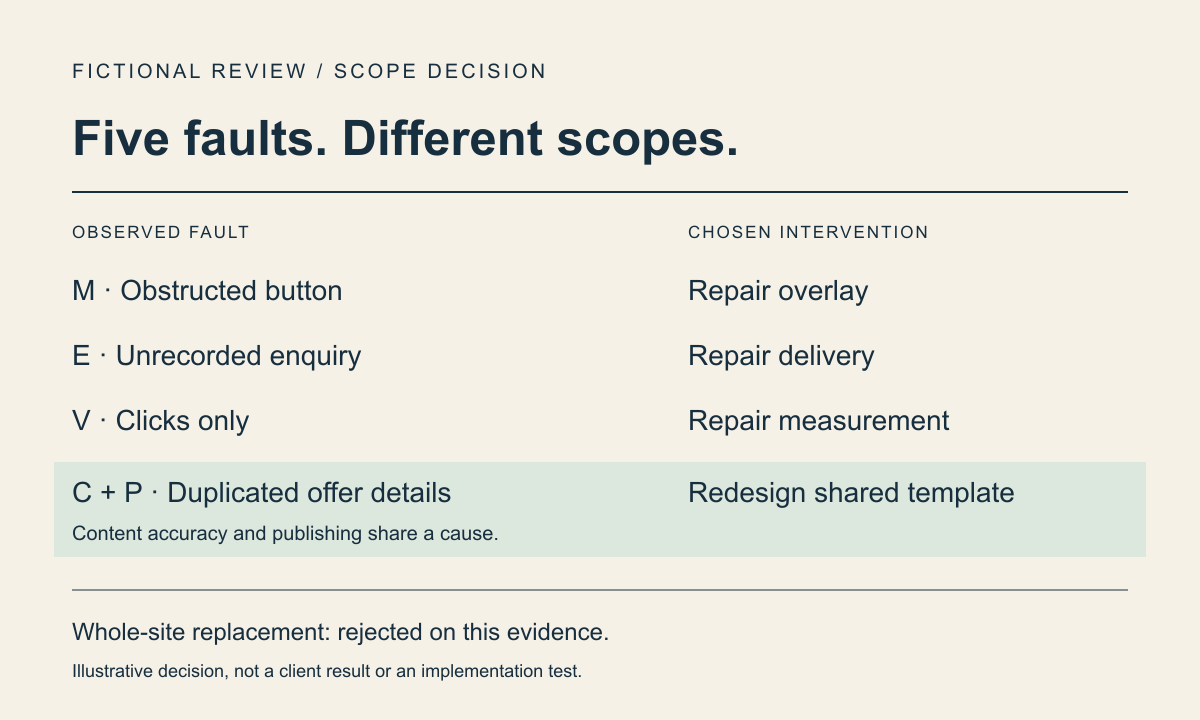
Work through a fictional website review to separate urgent enquiry repairs, content corrections and a justified shared-template redesign.
A redesign needs evidence of a shared problem
A broken enquiry form needs attention even if the rest of a website works. An unfashionable colour palette needs a different argument. I recommend deciding scope from the task that fails and the cause you can inspect, rather than adding up complaints until a redesign sounds inevitable.
The worked register below concerns a fictional consultancy selling a paid accessibility review. Its invented observations and trial outcomes demonstrate a decision, not research findings or an Ulties client result. Ulties builds websites and software; that commercial interest does not establish that a replacement is right for your site.
The consultancy begins with a proposal to replace its entire website. The register separates faults that need immediate repair from a shared publishing constraint. Each entry names a plausible cause, an intervention and the evidence needed to accept it. In a real review, attach the affected URL and reproduction steps before treating the cause as confirmed.
1. Mobile visitors cannot complete the main task
Register entry M: at a narrow viewport, a fixed contact strip covers the enquiry button. The same control remains hidden when a keyboard user moves focus to it. In this fictional inspection, disabling that strip reveals the button without changing the service content. That makes the overlay a specific repair candidate. It does not establish that every template is unusable.
The frontend owner removes the obstructing behaviour in a preview. The stipulated retest reaches and activates the button with a keyboard, then completes the form on the affected phone. The repair is accepted for that reproduced fault. The team rejects a replacement homepage as the remedy because it would leave the shared overlay code intact.
W3C WAI’s Easy Checks include keyboard access, visible focus and resized text. W3C also warns that these preliminary checks cannot establish full accessibility. I recommend using them to identify and retest barriers, then commissioning deeper evaluation where needed. A desktop screenshot or an automated pass cannot substitute for the affected task.
2. The content describes a previous business
Register entry C: a service page says the review includes implementing every recommended fix. The fictional offer actually covers an assessment and a prioritised report. Implementation needs a separate agreement. The content owner corrects that promise immediately. A new visual identity would not make the old promise accurate.
The first repair adds scope and exclusions to the existing text field. In the stipulated publishing walkthrough, those details appear, but the template truncates the exclusions in a fixed-height summary and repeats the old promise in a separately maintained sidebar. Editing the paragraph alone therefore fails acceptance. The cause is now partly structural, with duplicate offer information that can disagree.
I recommend recording that distinction explicitly: the inaccurate sentence is a content correction, while the truncated and duplicated information is a template problem. Do not infer a CMS replacement yet. A change to the existing content fields and their rendering may accommodate the offer without replacing the publishing platform.
3. Enquiries fail or lose context
Register entry E: a controlled test displays “sent” after a downstream receiver rejects the request. The example assumes the application retains no recoverable record. A click event and that banner do not demonstrate that anyone can act on the enquiry. The delivery owner must investigate the request path before another colour scheme is considered.
The agreed repair stores accepted requests before promising acceptance and exposes failed onward delivery to an operator. The example’s acceptance evidence is a stored reference for the test, correct service context at the receiver after a known rejection is resolved, and usable validation feedback. A deliberately ambiguous timeout remains unresolved until the receiver can be reconciled; blindly resending could duplicate an enquiry.
W3C’s forms guidance calls for clear submission feedback and actionable error messages. That supports the interface requirement, not a guarantee of delivery. I recommend wording feedback to match the state actually known: an application can confirm it recorded a request without claiming that sales has read it. The workflow described here is a proposed repair, not an executed queue or recovery implementation.
4. Nobody can explain whether changes help
Register entry V: a dashboard counts enquiry-button clicks, but the consultancy has not compared them with accepted requests. The analyst records “delivery and qualification unknown” rather than estimating lost revenue. The repair is to define those separate outcomes and check which records are actually available, with appropriate access and privacy controls.
Google describes Search Console as reporting how Google crawls, indexes and serves a site, with search performance including impressions and clicks. Those observations concern Search. They do not establish that an enquiry was accepted or qualified. I recommend checking the relevant page and query before interpreting a traffic change as evidence for a redesign.
No conversion improvement is claimed for this example. Sparse traffic can make a comparison inconclusive, and changing consent or instrumentation can change the recorded population. Fixing measurement is useful, but it must not delay a reproduced accessibility or delivery repair while the team waits for a persuasive chart.
5. Routine publishing repeatedly requires engineering
Register entry P: the editor can update ordinary copy, but cannot publish exclusions consistently across the service summary and its sidebar. Another request waits for approval of a new staff photograph. The template constraint overlaps entry C; the approval delay has a different owner. Replacing the CMS would not make an undecided photograph ready.
The team chooses a trial on the shared service template: keep one authoritative set of offer fields, render the exclusions without truncation, and remove the duplicated promise. The fictional editor updates those fields in preview and verifies both affected displays after publication. A long exclusion remains readable, and the repaired enquiry path is checked again. These are stipulated outcomes of the worked decision, not a tested implementation supplied with this article.
That trial supports expanding the template repair to the other pages using the same model, after checking their content differences. It does not justify replacing unrelated pages or changing every URL. The publishing owner separately assigns the photograph approval. If the existing system could not store or render the agreed fields, an alternative platform would become a candidate for a scoped prototype, not an automatic winner.
Choose the smallest coherent intervention
The completed decision rejects the original whole-site replacement. It accepts the overlay repair and urgent copy correction, gives enquiry recovery its own delivery work, and combines entries C and P into a shared service-template redesign. The common cause links the latter work. The number of complaints does not. Measurement repair runs alongside those tasks, without a promised sales uplift.
I recommend a broader redesign when inspected failures require the same underlying structure to change and a representative trial shows why separate repairs are insufficient. The trade-off is that a shared change can affect pages that currently work. Inventory those consumers and preserve their working tasks in acceptance checks. Conversely, unrelated local faults favour local repairs even when a new design would be more attractive.
W3C recommends integrating accessibility throughout production and continuing review over time. Assign a person to each acceptance check and revisit the affected task after release. This register is a way to challenge scope. It cannot provide a quote, prove return on investment or replace research with actual visitors. Your decision may differ when your evidence does.