

Tailwind CSS 4.0: trace a utility from source to computed color

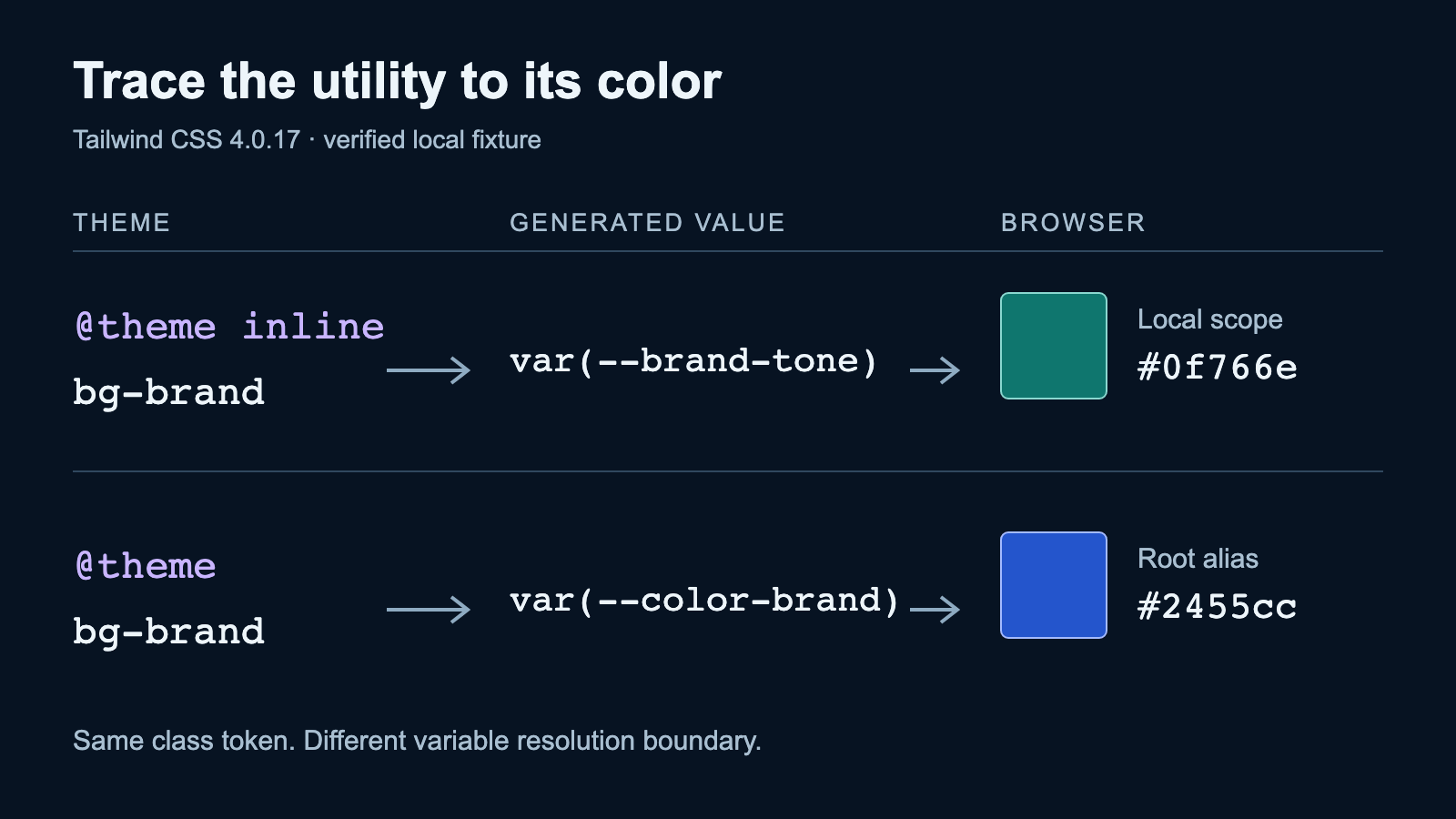
A compiled fixture separates source detection, theme registration and CSS variable scope, then checks a border default that can change the result.
Three boundaries behind one class
For a maintainer moving an existing theme to Tailwind 4, a class in the DOM is only the first checkpoint. The source scanner must find a complete token, the compiler must know the relevant utility and theme value, and the browser must resolve the resulting CSS in the intended scope. A successful build does not establish all three.
This explainer uses Tailwind CSS and its CLI at 4.0.17, Node 24.20.0, Playwright 1.63.0 and Chromium 153.0.8010.12, checked on 13 October 2026. The historical version makes the behavior reproducible. Do not use it as a recommendation to downgrade an application. The fixture compiles local files through the CLI so that framework and adapter configuration cannot obscure these boundaries. It does not test a PostCSS or Vite migration.
Register the token, then choose where its value resolves
The stylesheet registers --color-brand inside @theme inline. That gives the compiler a color token for bg-brand. The ordinary --color-ordinary declaration lives under :root: it can be read by regular CSS, but it does not register bg-ordinary. Their declaration context determines whether Tailwind knows these color variables as theme values.
The more subtle choice is inline. For this token, the generated utility reads var(--brand-tone) directly. Without inline, the utility instead reads var(--color-brand), whose alias is defined at the root. A child override of --brand-tone does not re-resolve the already inherited root alias. Choose inline when the utility should read an underlying variable in the element’s local scope. Use an ordinary theme alias when the root-resolved value is the intended behavior.
The source path is relative to this stylesheet. The fixture has real sibling styles and templates directories. The compiler scans templates rather than relying on the working directory to discover whichever files happen to be nearby.
@import "tailwindcss" source("../templates");

@theme inline {
  --color-brand: var(--brand-tone);
}
:root {
  --brand-tone: #2455cc;
  --color-ordinary: #7c3aed;
}
.brand-scope {
  --brand-tone: #0f766e;
}
Observe the scope change rather than guessing from the source
The panel below puts bg-brand inside .brand-scope, where --brand-tone is teal. It also includes the unregistered bg-ordinary candidate and a direct CSS rule using the ordinary variable. The latter demonstrates that a missing utility is not the same as an unusable CSS custom property.
In the recorded inline run, the brand background was rgb(15, 118, 110). Changing the scope’s --brand-tone to #7c3aed through the browser changed it to rgb(124, 58, 237). With inline removed, the background remained the root color, rgb(36, 85, 204), before and after the same local update.
The ordinary utility had a transparent background, while the direct CSS rule rendered purple. The compiled output contained .bg-brand and omitted .bg-ordinary. A separate mutation moved --color-ordinary into @theme: it generated the previously absent utility and failed the unchanged utility assertion. Removing inline failed the unchanged color assertion. These controls distinguish the two mechanisms instead of merely accepting a screenshot that looks plausible.
<!doctype html>
<html lang="en">
<head>
  <meta charset="utf-8">
  <meta name="viewport" content="width=device-width, initial-scale=1">
  <title>A scoped theme alias</title>
  <link rel="stylesheet" href="compiled.css">
  <style>body{font:16px Arial,sans-serif;padding:24px}section{padding:24px;max-width:480px}p{margin:16px 0}.ordinary-direct{background-color:var(--color-ordinary)}</style>
</head>
<body>
  <section class="brand-scope">
    <h1>A scoped theme alias</h1>
    <p class="bg-brand text-white" id="brand">A generated brand utility</p>
    <p class="bg-ordinary" id="ordinary">An ordinary variable does not register a utility</p>
    <p class="ordinary-direct text-white" id="direct">An ordinary variable still works in CSS</p>
  </section>
</body>
</html>
A runtime class can exist without corresponding CSS
The source fixture contains a complete bg-amber-500 class and assigns another class using the JavaScript expression 'bg-' + 'cyan' + '-500'. The compiler generated the amber utility. The browser received bg-cyan-500 at runtime, but its background stayed transparent because the compiled stylesheet lacked that selector.
The repaired variant uses a finite mapping containing the complete token, ({info: 'bg-cyan-500'}).info. The compiler then emits the cyan utility and the browser background becomes nontransparent. This is a synthetic demonstration of a scanner boundary, not a rule that every computed class is unsafe: another scanned file containing the complete token could include the same utility accidentally. Check the compiled output and the actual source relationship rather than trusting a development screen that happens to work.
<!doctype html>
<html lang="en">
<head>
  <meta charset="utf-8">
  <meta name="viewport" content="width=device-width, initial-scale=1">
  <title>Source and border checks</title>
  <link rel="stylesheet" href="compiled.css">
</head>
<body>
  <p class="bg-amber-500">Complete source token</p>
  <p id="dynamic">Runtime token</p>
  <p id="border" class="border text-green-700">Default border</p>
  <p id="explicit" class="border border-blue-700 text-green-700">Explicit border</p>
  <script>document.getElementById('dynamic').className='bg-'+'cyan'+'-500';</script>
</body>
</html>
Make shared source paths an observable dependency
A shared/component.html file sits outside the configured templates directory and contains bg-fuchsia-500. The scoped build omitted that utility. Adding @source "../shared" included it. Replacing the path with ../does-not-exist still produced a successful Tailwind 4.0.17 build, but omitted the shared utility.
The wrong-path control leaves the test expecting the shared selector. It fails at the source assertion after the ordinary scoped case succeeds. A compile exit code alone would have missed this particular mistake. My recommendation is to keep a representative shared class in a build check and assert that its selector is present. Avoid sprinkling duplicate class strings through application templates to hide an uncertain package path.
Check a default in the browser, not only the utility list
The browser fixture renders border text-green-700 next to border border-blue-700 text-green-700. The first has a one-pixel border whose computed color matches the text color. The second keeps a different, explicitly selected border color. A build producing .border would not reveal whether this observed Tailwind 4.0.17 behavior matches the previous design.
An injected base-layer gray border color fails the unchanged border assertion. This is one representative default check, not an audit of every change between Tailwind versions. During an application migration, compare the previous rendered states and make the intended border color explicit where text-color inheritance is unwanted. Forms, rings, shadows, hover behavior and required browsers need their own checks.
What these checks establish
The recorded fixture covers two theme variants, four source/default variants and four deliberate failures. It shows utility registration, alias resolution, complete-token detection, a shared path, one missing-path case and one border behavior in a single pinned Chromium version. It does not establish cross-browser support, accessibility, production performance, a complete application migration or compatibility with later Tailwind releases.
Download and extract the fixture bundle, then run python3 verify.py with Docker and Python 3 available. The initial build retrieves locked dependencies. Browser execution has no external network access. A successful run prints a JSON record with status pass, actual versions, source and compiled hashes, six normal cases and the four intended assertion failures. The archive contains the complete stylesheet/template dependencies and captured reference evidence.
Keep adapter installation and the application’s stylesheet import as a separate migration checkpoint. Then trace a representative utility through the three boundaries: find its complete source token, inspect its generated rule and observe its computed value in the actual component scope. That sequence gives a missing style a specific place to investigate.
Reproduce the examples
Exact CSS and HTML, shared component, locked Tailwind compiler, pinned Chromium runner, six normal cases and four intended failures. Requires Docker and Python 3. It does not certify a complete migration or cross-browser support.
Download the source and tests (.zip)